CooperativeCoding

An open specification for human-AI collaborative software design

v1.0.0 · CC-BY-4.0

What is CooperativeCoding?

Current agentic coding treats software as text to be generated. CooperativeCoding treats it as architecture to be negotiated.

CooperativeCoding is an open standard for human-agent collaborative software design. It provides a shared data model built on JSON Canvas v1.0 where architectural elements — classes, methods, fields, packages, and their relationships — are first-class objects of collaborative design stored in a ccoding metadata namespace.

Code design and code implementation are different skills that benefit from different tools. Humans excel at architectural thinking — defining responsibilities, drawing boundaries, seeing the big picture. Agents excel at translating precise specifications into correct, complete code. Today, both activities happen in the same text editor, forcing the human to think at the wrong level of abstraction and the agent to guess at the right one.

CooperativeCoding separates these concerns. Both human and agent work on a visual canvas — a simplified UML where design elements carry documentation contracts. The agent also works on the code, implementing the canvas design and keeping canvas and code in bidirectional sync. They cooperate through a continuous sync loop: the agent can loop autonomously (implement, test, fix, repeat) while every change stays visible on the canvas. The human can intervene at any point by editing the canvas or the code.

The specification is language-agnostic and tool-agnostic. It extends JSON Canvas with typed nodes, semantic edges, and sync rules. Concrete implementations require a canvas tool plugin, a language binding, a sync engine, and an agent integration — but the core spec defines the universal contract that all of them share.

Seven Principles

The foundation of human-AI collaborative design.

01

Design Authority is Human

Architectural decisions require judgment that agents do not have: business context, team dynamics, long-term maintainability tradeoffs. Both the human and the agent can change the canvas and the code, but the human always has final say. Every change is visible on the canvas, and the human can edit anything at any time.

02

Every Element is a Node

Every class, method, and field is its own node on the canvas, carrying full documentation: responsibility, pseudo code, signatures, and constraints. Each member exists independently, with its own identity and detail. Canvas tools may collapse or simplify nodes for readability, but the underlying data always carries the full detail.

03

Node Content is the Contract

Each node on the canvas carries natural language content: a responsibility statement, pseudo code, type signatures, and constraints. This content is the authoritative specification for what the corresponding code should do. Clear node content leads to correct implementation; vague content leads to guesswork.

04

Bidirectional Sync

Canvas and code are always in sync. Every change on either side produces a sync request for the other side. The agent processes each sync request and decides what changes are needed. The human sees every change reflected on the canvas in real time. Version control provides the audit trail and rollback.

05

Visual Simplicity

The canvas shows a simplified UML focused on architectural thinking. A handful of node kinds, a handful of edge relations, and structured markdown for content. A place to see the shape of the system at a glance.

06

Any Entry Point

Sketch on a blank canvas. Describe a system in natural language and let the agent create the initial design. Import existing code and let the sync engine generate the canvas. The paradigm meets you where you are.

07

Language-Agnostic, Tool-Agnostic

The core concepts of CooperativeCoding (nodes, edges, relationships, the sync loop) are universal. Each programming language gets a binding, each canvas tool gets an implementation, each agent gets an integration. The core spec defines the contract; bindings fulfill it.

The Cooperation Loop

A continuous cycle where human intent and agent capability meet.
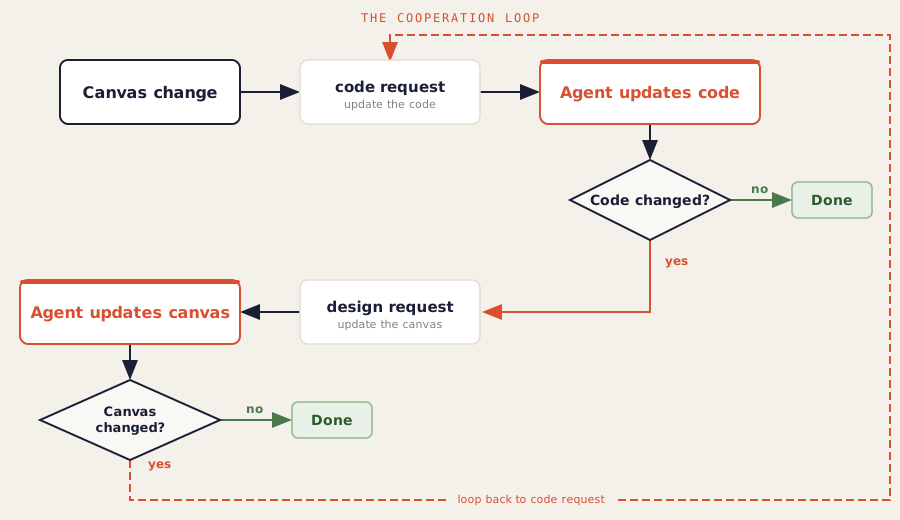
The Cooperation Loop - showing the bidirectional sync flow between canvas and code
Design

Human or agent creates or updates the canvas — classes, methods, fields, relationships, and documentation contracts. Both can edit the canvas and the code at any time. The canvas is where the human exercises architectural authority.

Implement

The agent generates or updates source code based on canvas elements. Documentation blocks become docstrings, edges become inheritance declarations and imports, node kinds become class skeletons. The agent can loop autonomously: implement, test, fix, repeat.

Sync

Every change on either side produces a sync request for the other. Canvas changes produce code requests; code changes produce design requests. The agent processes each request and decides what changes are needed. The loop continues until both sides match.
Visual Example

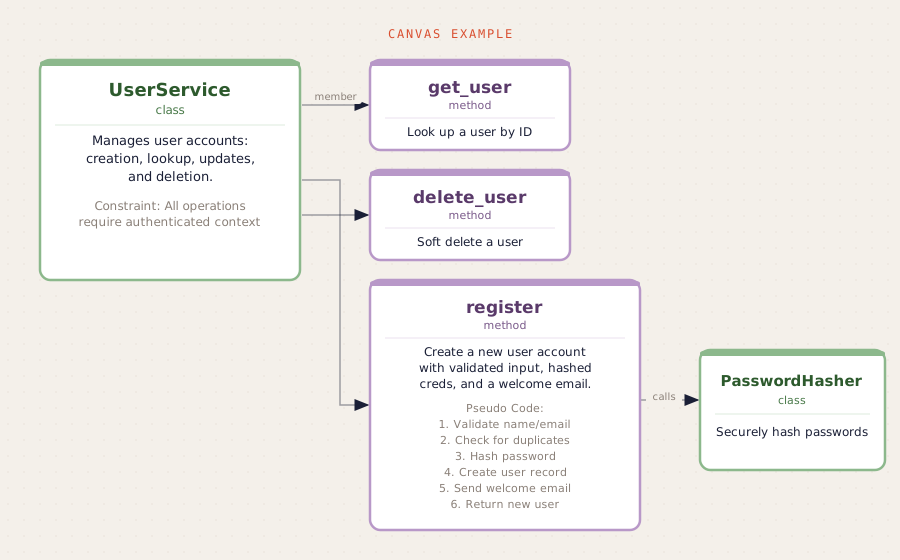
A UserService with its methods and dependencies, as it appears on a CooperativeCoding canvas.

A UserService class with get_user, delete_user, and register methods, plus a PasswordHasher dependency — shown as a CooperativeCoding canvas

Each node carries its own documentation contract: responsibilities, pseudo code, and constraints. The agent implements code from these contracts, and sync keeps both sides aligned.

Generated Python Code

The sync engine generates this code from the canvas above. Signatures and docstrings come from the nodes; method bodies are left as stubs for the agent to implement.

class UserService:
    """Manages user accounts: creation, lookup, updates, and deletion.

    Responsibility:
        All user lifecycle operations including registration,
        lookup, updates, and soft deletion.
    """

    def get_user(self, user_id: str) -> User:
        """Look up a user by ID."""
        raise NotImplementedError

    def delete_user(self, user_id: str) -> None:
        """Soft delete a user."""
        raise NotImplementedError

    def register(self, name: str, email: str, password: str) -> User:
        """Create a new user account with validated input, hashed creds, and a welcome email.

        Pseudo Code:
            1. Validate name and email format
            2. Check for duplicates in db
            3. Hash password using hasher
            4. Create user record in db
            5. Send welcome email
            6. Return new user
        """
        raise NotImplementedError

Data Model

The building blocks of architectural description — a semantic layer on top of JSON Canvas v1.0.

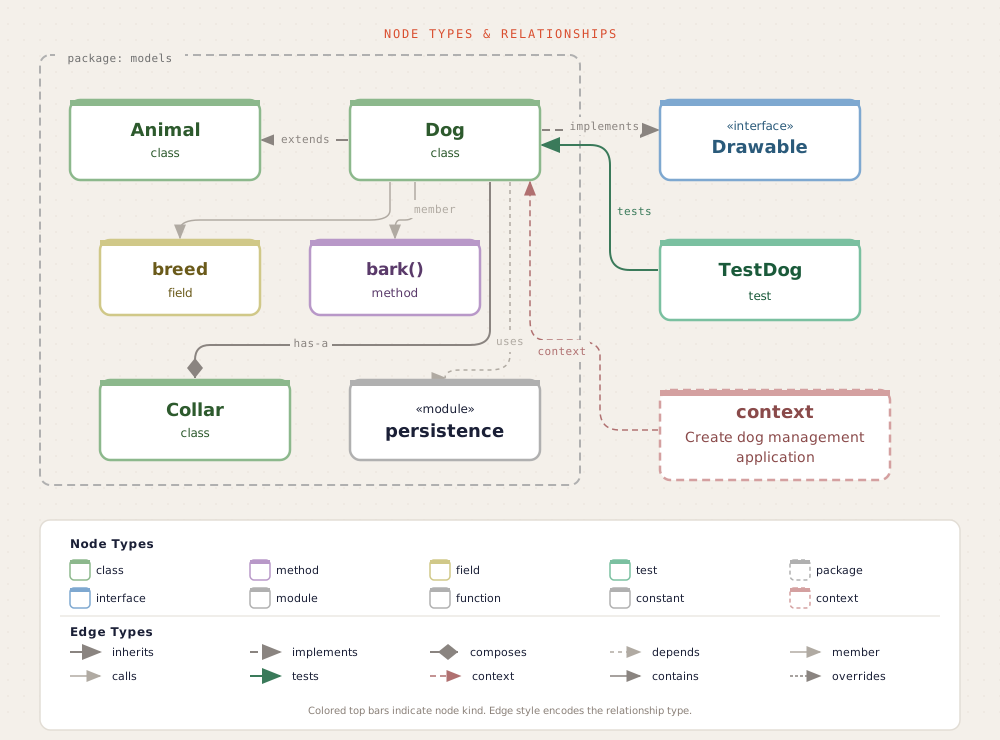
Node types and relationships diagram showing class, interface, method, field, test, context, and package nodes with their edge relations

Node Kinds

class A class, struct, trait, or equivalent named type. The primary building block. Carries responsibility, fields, methods, and constraints in its documentation block.
method A method or function as its own node on the canvas. Connected to its parent class via a member edge. Contains signature, pseudo code, and constraints.
field A field or property as its own node on the canvas. Used when a field carries significant design semantics — a configuration object, a dependency injection point.
package A package, module, or namespace that groups related types. Used for high-level architectural views and directory structure generation.
test A test class or suite that verifies production code. Connected to classes under test via tests edges. Carries test execution results alongside design intent.
interface An interface, protocol, or abstract contract. May also be represented as a class node with an appropriate stereotype.
module A single-file module or compilation unit, distinct from package in languages where the distinction matters.
function A free-standing function or procedure that does not belong to any class. Used in languages where top-level functions are idiomatic.
constant A module-level constant, configuration value, or global binding with architectural significance.

Edge Relations

inherits Class extends or subclasses another. Generates inheritance declarations.
implements Class adopts an interface or protocol. Generates conformance declarations.
composes Has-a relationship. The edge label carries the field name. Generates typed field declarations.
depends Import-level dependency. Generates import statements in the source file.
calls Runtime method invocation. Produces sync requests but has no defined code construct — the agent decides what changes, if any, are needed.
member Connects a class node to a method or field.
tests Test node verifies a class. Connected via a tests edge.
context Links a context node to a code element. Canvas-only — design rationale and references.
contains Links a package or module node to the elements it contains. Structural grouping.
overrides Indicates that a method node overrides a method in a parent class.
Stereotypes extend node semantics with language-specific subtypes. The set is open and extensible: protocol, dataclass, enum, abstract, singleton, mixin, and any others your language binding defines. Unknown stereotypes are preserved and displayed as-is — implementations must not reject them.

Bidirectional Sync

Canvas and code are two views of the same system. The sync engine keeps them honest.

What Syncs

  • New class nodes generate source files with class skeletons
  • Changed field or method lists update class definitions in code
  • Documentation edits propagate to docstrings and doc comments
  • New inherits edges create inheritance declarations
  • New implements edges create protocol conformance
  • New composes edges generate typed field declarations
  • New depends edges generate import statements
  • Code-side class creation generates canvas nodes
  • Code-side documentation changes update canvas node text
  • Test results flow from code to test node content

What Never Syncs

  • Method bodies — implementation is code's domain
  • Local variables and control flow within functions
  • Context nodes — design rationale stays on the canvas
  • calls edges — produce sync requests but have no defined code construct
  • Canvas layout positions — node arrangement is visual only

Getting Started

Four steps to begin working with CooperativeCoding.

1

Read the Specification

Start with the Introduction for the vision and principles. Then explore the Data Model, Lifecycle, Sync, and Language Bindings documents for the full technical contract.

Read the Introduction →
2

Choose Your Canvas Tool

CooperativeCoding works with any canvas tool that supports JSON Canvas v1.0. The reference implementation uses Obsidian with a dedicated plugin that renders CooperativeCoding nodes and edges.

Explore JSON Canvas →
3

Set Up a Language Binding

Each programming language needs a binding that maps abstract spec concepts to language-specific idioms. The Python binding is the reference implementation, covering stereotypes, AST parsing, type translation, and sync mapping.

Python Binding Reference →
4

Integrate Your Agent

Teach your agentic coding tool the cooperation protocol: process sync requests in both directions, implement code from canvas designs, update the canvas when code changes, and loop autonomously while keeping everything visible. The spec defines the cooperation contract; your agent fulfills it.

View on GitHub →

Specification Documents

The complete CooperativeCoding specification, organized in five core documents plus a language binding reference.

00-introduction.md

Vision, core principles, terminology, scope, non-goals, and the document index. Start here to understand why CooperativeCoding exists and what it defines.

Read →
01-data-model.md

Canvas nodes, edges, and metadata schemas. Node kinds, edge relations, the ccoding namespace, edge labels, context nodes, and node text content rules.

Read →
02-lifecycle.md

Entry points, the sync loop, agent and human roles, and agent communication approaches. How the continuous bidirectional sync model works in practice.

Read →
03-sync.md

Bidirectional sync semantics. Canvas-to-code rules, code-to-canvas rules, state tracking via qualified names, sync triggers, and the convergence guarantee.

Read →
04-language-bindings.md

The contract for language-specific mappings. Stereotype mapping, AST parsing, type translation, documentation format, and the three-tier compliance model (MUST, SHOULD, MAY).

Read →
bindings/python.md

The reference Python binding. Covers Python stereotypes, docstring conventions, type annotation mapping, ccoding CLI usage, and structured content conventions.

Read →